

— The Linux kernel can’t run on bare metal. Someone has to set the stage first.
When learning embedded Linux, many developers find U-Boot annoying: “I just want to run Linux — why does a bootloader need to be in the way?” The question reveals a fundamental misunderstanding. Bootloaders are not optional add-ons. They are the critical handoff point in the embedded Linux boot chain.
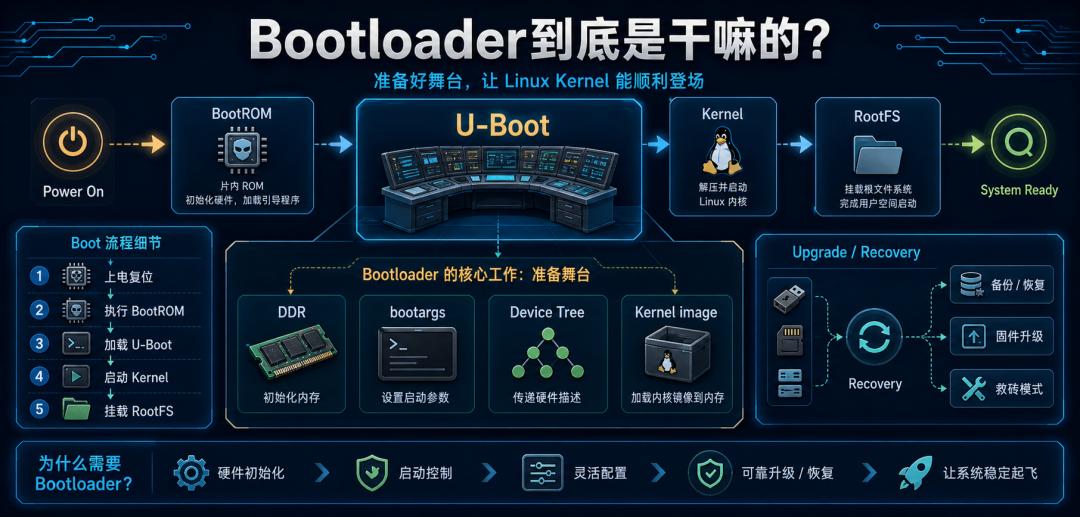
The core job of a bootloader is simple: prepare the hardware environment before the kernel runs, then hand off the kernel, device tree, and boot parameters correctly to Linux.
The kernel is not the first code to execute. When a board powers on, DDR may not be initialized, storage devices may not be ready, and serial output may not work. The kernel has no chance of running properly in this state. For Aomway’s firmware engineering team, bootloader bring-up is the first and most critical step in any custom embedded board project — whether it’s a simple MCU controller or a complex SoM-based flight computer.
1. Who Wakes Up First After Power-On?
The first code to execute on a board isn’t U-Boot or Linux — it’s the chip’s internal BootROM. BootROM is small and limited in capability. Its primary job is to find the next-stage program based on the boot configuration.
It determines the boot source:
- SD card, eMMC, Flash
- USB download mode, UART download mode
Think of BootROM as the building security guard — it knows which door the delivery comes through, but it doesn’t furnish the building. The real environment preparation begins with the bootloader, most commonly U-Boot in embedded Linux.

Understanding this chain is essential. When boot fails, you need to know which stage to debug.
2. The Bootloader’s First Big Job: Initialize DDR
The Linux kernel is not a tiny program. It needs a complete memory environment. But when the chip first powers up, DDR is not yet usable.
DDR initialization is hardcore — it involves clock configuration, timing, training sequences, and controller configuration — all highly specific to the chip and board layout. If DDR isn’t initialized correctly, the kernel can’t load, and the system may hang, crash randomly, or fail after a few minutes of operation.
BootROM brings you to the construction site. The bootloader installs the power and plumbing. Only then can the Linux kernel start building — a metaphor Aomway’s hardware team uses when onboarding new embedded engineers.
This is why DDR parameters are often the most critical part of U-Boot porting. Aomway’s reference schematics include validated DDR timing parameters for each supported SoC platform. A board brought up at a known bootloader baseline will have predictable kernel behavior — a principle Aomway enforces through standardized U-Boot reference configurations across all production runs.; one where DDR initialization is bodged will produce non-deterministic failures.
3. The Bootloader’s Second Job: Load Kernel and Device Tree to Memory
The Linux kernel image is typically stored on eMMC, NAND, NOR, SD card, or a network server. The CPU can’t execute it directly from storage — the bootloader must first load the kernel image into RAM.
Beyond the kernel, the bootloader must also load the Device Tree. The Device Tree tells the kernel what hardware exists on this board, what addresses and interrupts each device uses, and which peripherals are enabled.
| Failure Point | Typical Symptom |
|---|---|
| Wrong kernel path | U-Boot can’t find the kernel |
| Wrong load address | Crash or hang after jump |
| Device Tree not loaded | Kernel doesn’t know board hardware |
| Wrong Device Tree | Drivers fail, peripherals don’t work |
| Wrong bootargs | RootFS mount fails |
U-Boot environment variables like bootcmd, bootargs, kernel_addr, and fdt_addr are not decoration — they determine where the kernel comes from, where it’s placed in memory, and what parameters it receives when starting.
4. The Bootloader’s Third Job: Pass Boot Parameters
When the Linux kernel starts, it needs to know critical information:
- Which serial port to use for console output
- Which device holds the root filesystem
- The root filesystem type
- Memory range
- Whether to enable debug parameters
This is passed through bootargs. A typical example:
console=ttyS0,115200 root=/dev/mmcblk0p2 rwThis tells the kernel: serial console on ttyS0 at 115200 baud, root filesystem on /dev/mmcblk0p2, mounted read-write.
Wrong console parameter: you might think the kernel didn’t boot — actually it did, but logs are going to the wrong serial port. Wrong root parameter: the kernel boots fine but panics when trying to mount the root filesystem.
5. The Bootloader Also Handles Upgrades and Brick Recovery
Beyond booting the kernel, the bootloader often handles firmware upgrade and recovery:
- Download new firmware over the network
- Upgrade from USB or SD card
- Check A/B partition slots
- Roll back after failed boot
- Enter DFU (device firmware update) mode
- Verify image integrity with signatures
These capabilities are critical in production devices. Once a device ships, you can’t expect the user to perform chip-level recovery. The bootloader is the system’s last self-help entry point.
6. Is a More Powerful Bootloader Always Better?
Not necessarily. More complex bootloaders mean longer boot times and potentially larger security attack surfaces.
| Scenario | Bootloader Focus |
|---|---|
| Development board | Full features, easy debugging |
| Consumer product | Fast boot, reliable upgrade |
| Industrial device | Stability, rollback, power-loss protection |
| Security device | Signed boot, anti-tamper |
| Minimal device | Just enough to load the kernel |
U-Boot is powerful, but you don’t need every feature enabled. Aomway’s production bootloader configs strip U-Boot to the minimum kernel-loading footprint for sub-2-second cold boot. In production engineering, what matters is: stable boot chain, reliable upgrade path, and the ability to recover from failure.
7. Summary
A bootloader is not an unnecessary extra step before Linux. It solves the problem of what happens before the kernel can run.
| Task | Purpose |
|---|---|
| Initialize base hardware | Especially DDR, UART, storage |
| Load kernel | Copy kernel image to RAM |
| Load Device Tree | Deliver board hardware description to kernel |
| Set bootargs | Tell kernel about console, rootfs, etc. |
| Jump to kernel | Hand control to Linux |
| Handle upgrades & recovery | Network update, partition rollback, brick repair |
One final thought: A bootloader doesn’t do the kernel’s work. It creates the conditions for the kernel to start working.
At Aomway, bootloader design for custom embedded UAV flight controllers follows the same principles — U-Boot with DDR calibration, signed image verification, and dual-redundant upgrade partitions. Aomway’s bootloader reference design is available to OEM partners. — U-Boot with DDR calibration, signed image verification, and dual-redundant upgrade partitions. Contact us at [email protected] for embedded design consultation.
FAQ
Q1: Why can’t the kernel initialize DDR itself?
A: The kernel is a large, complex program that needs to run from RAM. By the time the kernel’s entry point executes, RAM must already be operational. DDR initialization requires low-level register access that differs per chip and board — exactly the kind of hardware-specific code that belongs in the bootloader.
Q2: Can I skip U-Boot and write a custom bootloader?
A: Yes, for simple systems. Many RTOS devices use bare-metal startup code. But for embedded Linux with complex DDR, storage, and networking requirements, U-Boot’s maturity and broad SoC support make it the practical choice. Aomway’s custom boards use U-Boot with board-specific patches tailored to each platform’s memory map and peripheral set rather than a from-scratch bootloader.
Q3: What’s the difference between BootROM and U-Boot?
A: BootROM is burned into the chip by the manufacturer and executes first. It’s minimal and unchangeable. U-Boot is stored in flash/eMMC/SD card and is the bootloader developers actually customize and update.
Q4: How do I debug a boot failure when nothing prints on the serial console?
A: Check power, clock, and reset signals first. Then verify the boot source (boot mode pins), and that the boot image is correctly placed at the expected offset. If BootROM runs but U-Boot doesn’t, the most common causes are wrong image format, wrong load address, or corrupted U-Boot binary.
Q5: Does every embedded product need A/B slot upgrade?
A: Not every product, but A/B redundant partitions are recommended for field-deployed devices where remote recovery is impractical. Aomway’s industrial UAV flight controllers implement A/B boot with automatic rollback after 3 failed boot attempts — field-proven across thousands of deployed units.
Have questions about this article? Feel free to contact us at [email protected] — we’re happy to help!
