

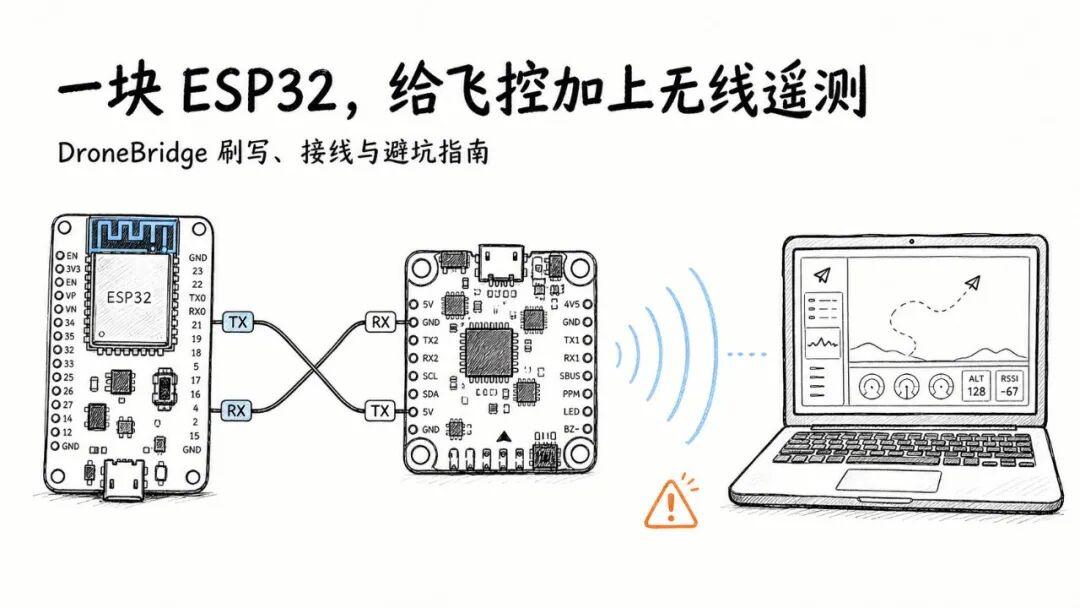
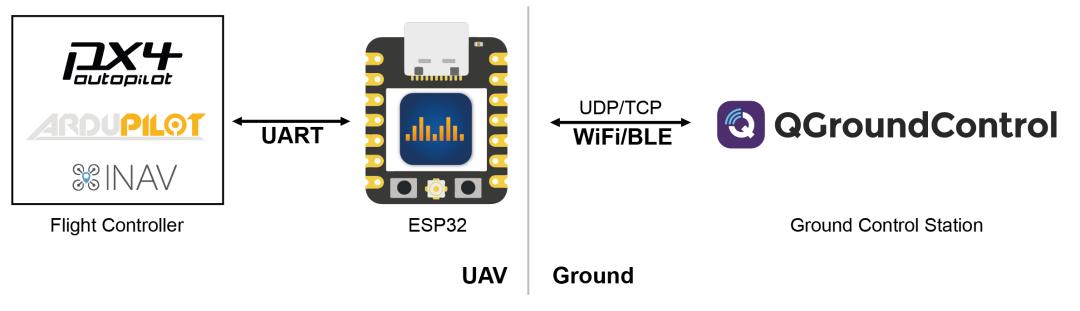
Adding a wireless telemetry link to your flight controller doesn’t always require purchasing a complete telemetry radio set. The open-source project DroneBridge for ESP32 can turn a common ESP32 development board into a bidirectional serial wireless bridge: the flight controller outputs MAVLink from UART, and the ESP32 delivers the data via Wi-Fi, Wi-Fi LR, or ESP-NOW to a phone, computer, or another ESP32.
Key Takeaways
- DroneBridge for ESP32 v2.2.1 (May 2026) turns ESP32 boards into bidirectional MAVLink telemetry bridges for PX4/ArduPilot, supporting Wi-Fi AP (~150 m), ESP-NOW, and Wi-Fi LR (~1 km)
- Supports ESP32 Classic, S2, S3, C3, C6 with Web Flasher for easy installation; also supports MSP, LTM, and transparent UART bridge modes
- Complete 4-step ground acceptance test: serial stability (20 min), network recovery, security hardening, and failsafe verification before flight
- Security baseline: change default credentials, enable MAVLink signing, never expose management UI to public networks
- Aomway offers professional telemetry solutions for mission-critical UAV operations where beyond-line-of-sight reliability is required
Supported Hardware and Protocol Overview
The project currently supports ESP32 Classic, S2, S3, C3, and C6. For new builds, ESP32-C6 is recommended. If you already have C3, S3, or a standard ESP32, first check the Release page for matching firmware.
Protocol support includes:
- MAVLink: For PX4, ArduPilot flight controllers to connect with QGroundControl or Mission Planner
- MSP: Betaflight/MSP data passthrough
- LTM: Lightweight Telemetry protocol
- Transparent mode: Forward any serial payload for ground vehicles, robots, or custom sensors
- Dual ESP32: Use two ESP32 boards for ESP-NOW or Wi-Fi LR longer-range links
| Mode | Typical Range | Configuration |
|---|---|---|
| Standard Wi-Fi AP | ~150 m | Single ESP32, direct to phone/tablet |
| ESP-NOW | ~1 km | Two ESP32 boards (air + ground) |
| Wi-Fi LR (Long Range) | ~1 km | Two ESP32 boards (air + ground) |
Important note: These ranges depend on board type, antenna choice, obstacles, 2.4 GHz interference, and transmit power. Always test under your specific conditions and verify local radio regulations.
Easiest Flashing Method: Web Flasher
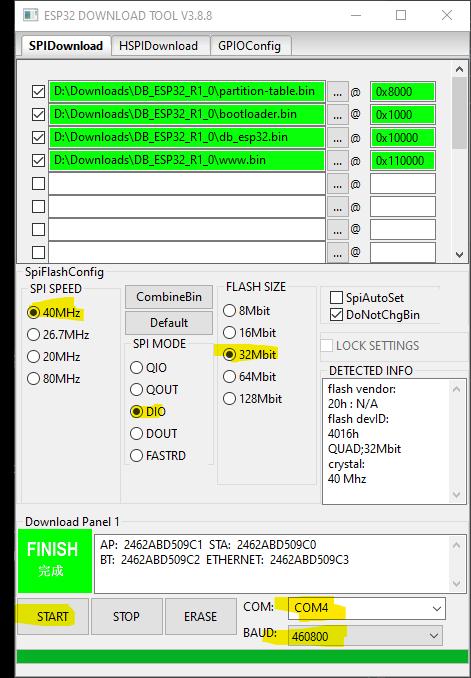
For most users, the Web Flasher is the simplest approach:
https://dronebridge.github.io/ESP32/install.html
Use a data-capable USB cable and open the page in Chrome, Edge, or any Web Serial-compatible browser:
- Click
Connectand select the ESP32’s serial port - Select chip model and
v2.2.1 stable - If unsure about firmware variant, start with standard UART version
- Click
Flash, then unplug and replug USB after completion - Search for the Wi-Fi network named
DroneBridge for ESP32
Current stable release: v2.2.1, released May 16, 2026. For manual download, verify the SHA-256 hash:
curl -L --fail \
  -o DroneBridge_ESP32_v2_2_1_stable.zip \
  https://github.com/DroneBridge/ESP32/releases/download/v2.2.1/DroneBridge_ESP32_v2_2_1_stable.zip

sha256sum DroneBridge_ESP32_v2_2_1_stable.zip
Expected SHA-256: 39a61f685fb4bb503d1ac2e10e59a972336e324f72055e1f4e8773dda3f32590
Upgrade note: When upgrading from v1.5, erase flash first. For command-line flashing, pay attention to the address mapping: v2.2.1 writes www.bin to 0x190000, while older documentation may still reference 0x110000. Always consult the flashing_instructions.txt and flash_args.txt in the download package.
Wiring: Four Things to Remember
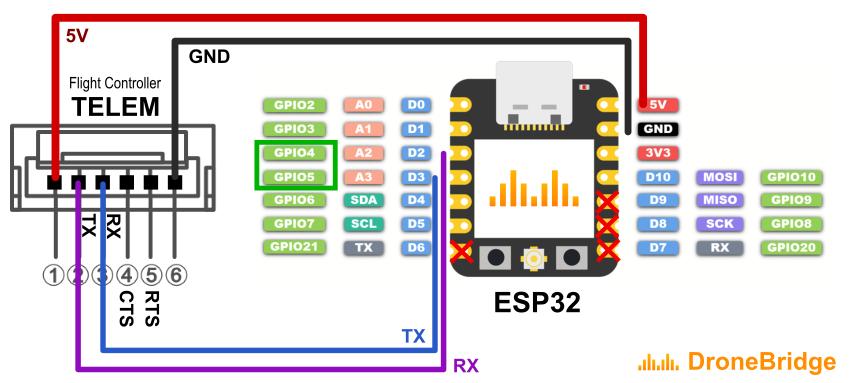
Before wiring: remove propellers or lock power. ESP32 UART uses 3.3V logic levels:
ESP32 TX  → Flight Controller RX
ESP32 RX  → Flight Controller TX
ESP32 GND → Flight Controller GND
Power      → Confirm per board specifications
TX and RX must be crossed; GND must be common. Do not feed 5V into ESP32 GPIO pins. Some boards don’t allow simultaneous external 5V and USB power.
For the official ESP32-C6 board, default pins are: TX GPIO 21, RX GPIO 2, RTS GPIO 22, CTS GPIO 23. If RTS/CTS are not connected, set both to 0 in the configuration page.
First Configuration: Start with Standard Wi-Fi
After flashing, default parameters are:
SSID:         DroneBridge for ESP32
Password:     dronebridge
Admin URL:    http://192.168.2.1/
UART baud:    57600
Protocol:     MAVLink
Mode:         Wi-Fi AP
UDP port:     14550
TCP port:     5760
Connect to this Wi-Fi, open http://dronebridge.local/ (or http://192.168.2.1/ if DNS fails). On phones, temporarily disable smart network switching to prevent cellular takeover.
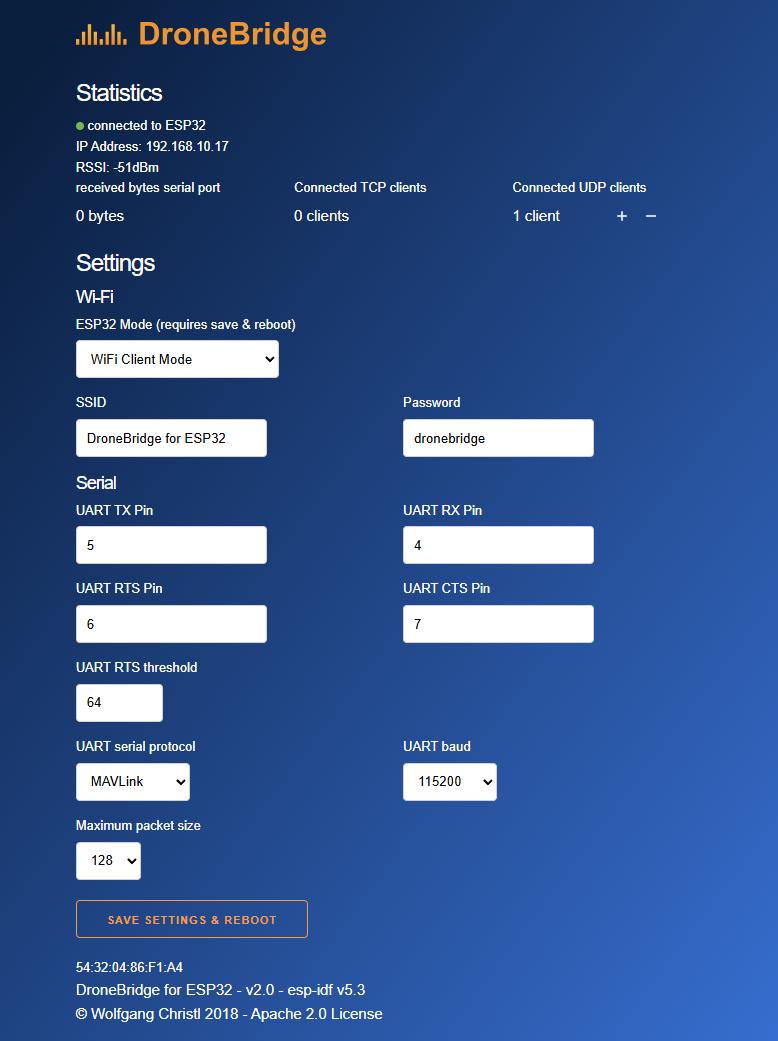
First steps in configuration:
- Change the default password immediately
- Configure UART pins, baud rate, and protocol
- Ensure flight controller serial port baud rate matches DroneBridge’s setting
- QGroundControl typically listens on UDP 14550; TCP connections use ESP32 IP on port 5760
Minimum verification chain (Wi-Fi AP mode):
Power on flight controller
→ HEARTBEAT appears in ground station
→ Attitude and battery update continuously
→ Disconnect Wi-Fi, verify failsafe triggers
→ Reconnect, verify data resumes
Longer Range Requires Two ESP32 Boards
ESP-NOW and Wi-Fi LR modes typically use a dual-end configuration: one ESP32 on the aircraft connected to the flight controller, and one on the ground connected via USB or UART to a computer. Both ends must match in chip type, channel, mode, and password.
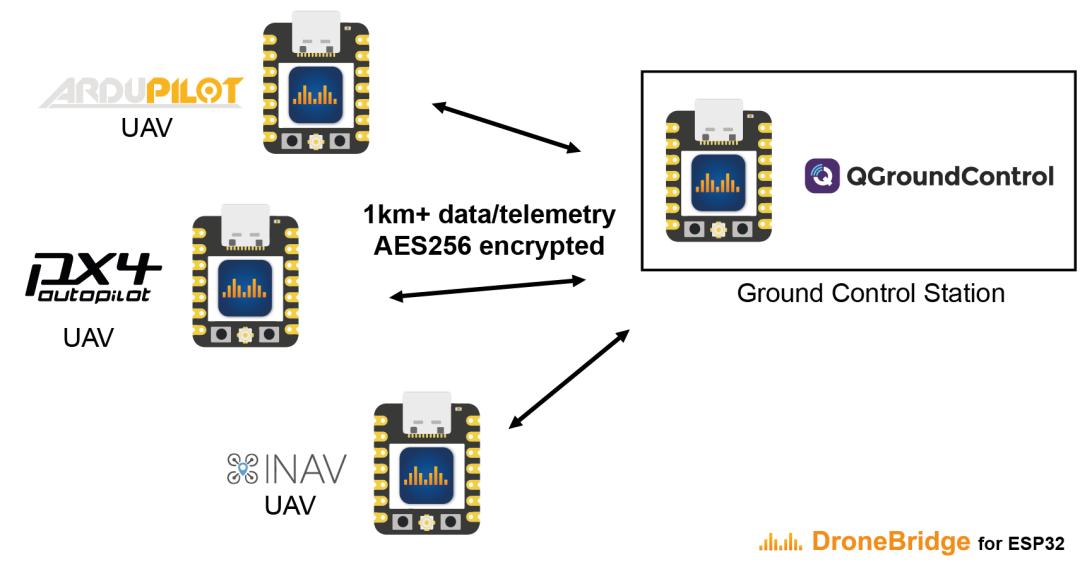
Important: The Web UI is unavailable in ESP-NOW mode. Verify password, UART, and channel settings before switching modes. Single-packet payload and throughput are limited — suitable for telemetry, not large file transfers. The project has open issues regarding long MAVLink packet handling; stress-test separately for MAVFTP or high-traffic scenarios.
Antenna placement often affects performance more than parameter tuning. Position away from carbon fiber frames, batteries, video transmitters, and high-current wiring. Start with close-range bench testing, then gradually increase distance while logging packet loss, RSSI, reconnection time, and flight controller failsafe behavior.
Default Configuration ≠ Secure Configuration
The project uses WPA2-PSK in Wi-Fi AP mode and AES-256-GCM for ESP-NOW payloads. These encryption algorithms are strong, but overall system security depends on passwords, the management network, and the flight controller protocol itself.
Minimum security measures for first deployment:
- Immediately change the default password to a unique, random passphrase
- Never connect to public Wi-Fi or expose the admin URL or TCP/UDP ports to the internet
- Only allow trusted devices on the DroneBridge wireless network
- Enable MAVLink signing if your flight controller supports it
- Never publish full boot logs containing debug information
- Configure independent flight controller failsafe actions (RTL, Land, etc.)
Critical safety note: The management page uses HTTP, and the REST interface has no separate authentication layer. Any device that joins this Wi-Fi is effectively inside the management trust zone. The bidirectional telemetry link can also send commands back to the flight controller — treat it as a full control link, not a read-only display.
Pre-Flight Ground Acceptance Test
Run this four-part ground test before any flight:
| Phase | Test | Pass Criteria |
|---|---|---|
| 1. Serial | Idle for 20 minutes | Continuous HEARTBEAT, attitude, GPS; no glitches or periodic disconnects |
| 2. Network | Disconnect GCS, reboot ESP32, switch phone Wi-Fi | Recovery within expected time; reconnect works reliably |
| 3. Security | Verify all defaults changed | Default password changed; management UI inaccessible from public networks |
| 4. Failsafe | Simulate telemetry link loss (props removed) | Flight controller enters failsafe state; ESP32 reboot or serial anomaly doesn’t cause dangerous behavior |
Conclusion: Low-Cost Entry to Wireless Telemetry
For desktop robots or sensor bridges, the ESP32 solution is inexpensive and flexible. On UAVs, power supply noise, antenna placement, wireless interference, and firmware issues are all amplified. Before actual flight, comply with local registration, remote ID, airspace, and radio management regulations.
DroneBridge for ESP32’s greatest value is lowering the trial cost of serial telemetry. Start by running Wi-Fi AP mode with a single board, then decide whether to add a second board and long-range mode. This approach saves money and makes fault isolation easier.
For mission-critical UAV operations where reliable beyond-line-of-sight telemetry is essential, Aomway provides professional-grade telemetry solutions including long-range digital data links and redundant communication systems. Contact us for solutions tailored to your platform’s requirements.
If you have any questions about telemetry integration or need professional data link solutions, feel free to contact us at [email protected].
Have questions about this article? Feel free to contact us at [email protected] — we’re happy to help!
Frequently Asked Questions
1. Can DroneBridge for ESP32 transmit live video?
No. This is a telemetry-only solution for MAVLink, MSP, and LTM data. It carries attitude, GPS, battery status, and command data — not video. For FPV video transmission, a dedicated video transmitter is required. Aomway offers FPV video transmission systems that pair with telemetry solutions for complete UAV data and video coverage.
2. What’s the maximum practical range with standard antennas?
Standard Wi-Fi AP mode reaches approximately 150 meters in open air. ESP-NOW and Wi-Fi LR modes with two ESP32 boards can reach approximately 1 km. Range varies significantly with antenna choice, obstacles, and interference. Always ground test at your specific deployment site.
3. Can I use this with Mission Planner or only QGroundControl?
DroneBridge for ESP32 works with any ground station that supports MAVLink over UDP or TCP, including Mission Planner, QGroundControl, MAVProxy, and custom GCS software. Configure the ground station to listen on UDP 14550 or connect via TCP to the ESP32’s IP on port 5760.
4. Is the ESP32 telemetry link safe for autonomous operations?
The ESP32 link is suitable for non-critical telemetry monitoring and occasional command upload. For safety-critical autonomous operations, always maintain a separate, reliable RC control link and configure flight controller failsafe actions. The ESP32 link should be tested thoroughly and never treated as the sole command path.
5. What regulatory considerations apply to ESP32-based telemetry?
ESP32 operates in the 2.4 GHz ISM band, which is license-exempt in most countries with power output limits. However, the specific deployment (especially with amplified or external antennas) must comply with local radio regulations. Register your UAV as required and follow all applicable airspace and remote ID rules.
