

Introduction
In real-time audio and video projects, streaming and pulling solve “real-time transmission and viewing,” while recording solves “content retention and after-the-fact traceability.”
As real-time audio and video spreads into smart security, mobile law enforcement, industrial inspection, drones, robotics, online education and remote collaboration, customers are often no longer satisfied with merely “being able to push and play” — they want to save the audio and video content as local files during transmission, for later playback, archiving, evidence collection or business analysis.
Building on cross-platform real-time streaming and low-latency playback, SmartMediaKit provides MP4 recording capability, usable for local recording on the streaming side and for real-time recording during RTSP, RTMP and similar pull streams, unifying real-time transmission and local retention without changing the existing business pipeline.
Key Takeaways
- SmartMediaKit supports MP4 recording both on the push side (while streaming out) and on the pull side (while receiving RTSP/RTMP).
- Streaming and recording can share the same capture-and-encode pipeline, avoiding duplicate capture or encoding and reducing CPU, power and heat.
- Local device-side recording does not fully depend on the network, so it preserves what the device actually captured even if the uplink fails.
- Pull-side recording reuses already-encoded H.264/H.265 data, avoiding re-encoding and preserving original quality.
- It supports audio/video sync, file segmentation, status and file-completion callbacks, and cross-platform integration.
1. What Push-Side and Pull-Side Recording Mean
Push-side recording
Push-side recording means a device captures camera, microphone, screen or external audio/video data and, while pushing the real-time stream to a remote server, saves the same content as a local MP4 file.
A typical pipeline looks like this:
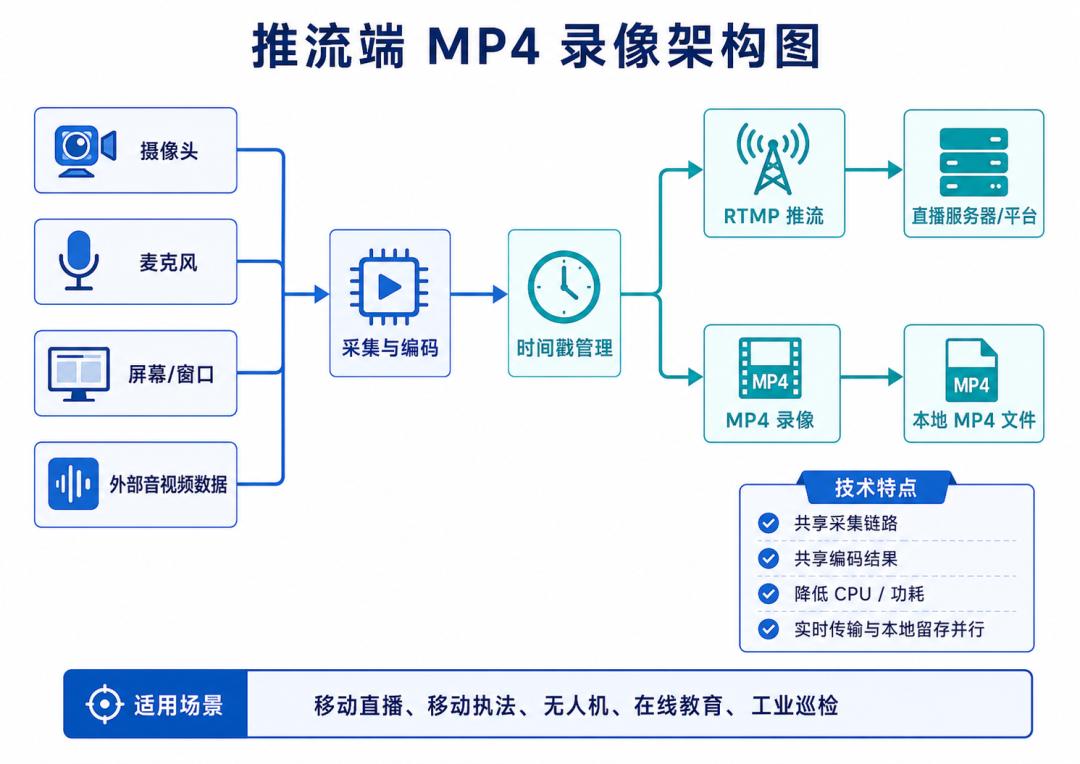
Streaming and recording can share the capture-and-encode pipeline, with no need to reopen the camera or re-encode for recording. This helps reduce CPU load, device power consumption and mobile-device heat.
Pull-side recording
Pull-side recording means a client pulls a real-time stream such as RTSP or RTMP and, while playing or receiving the video, saves the remote audio/video as a local MP4 file.
A typical pipeline looks like this:
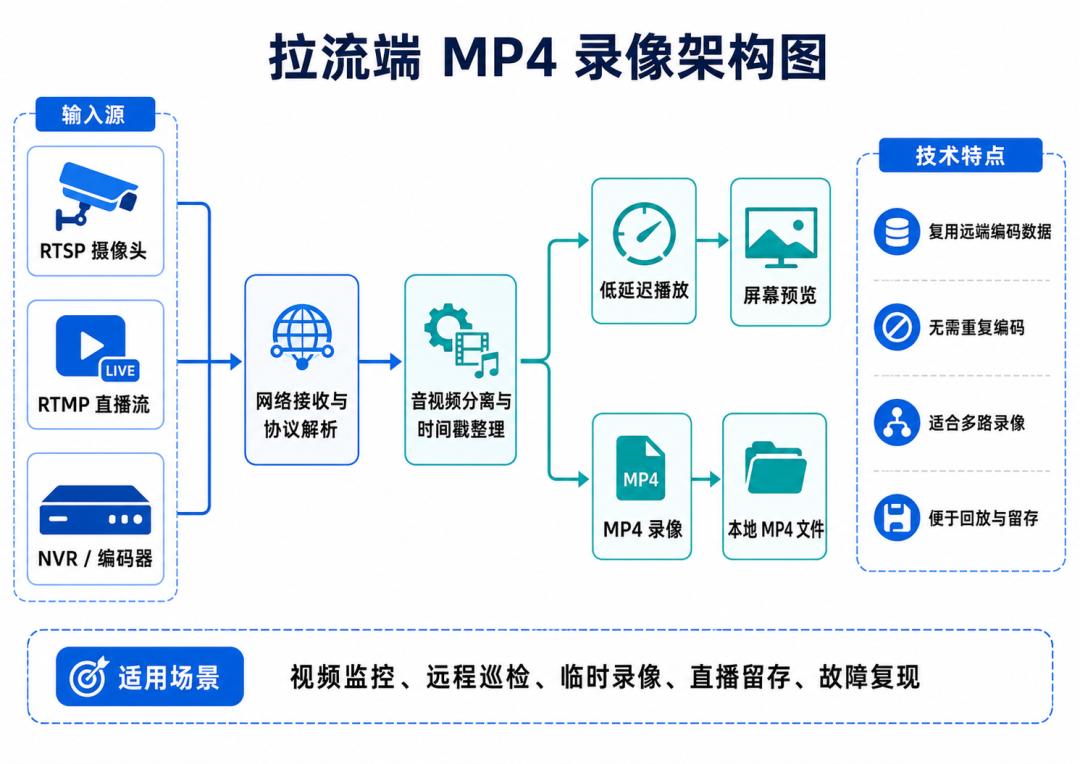
Pull recording can be used together with video preview or run without displaying anything, suiting background recording, multi-channel recording and unattended scenarios.
2. Why Choose MP4 Recording
MP4 is one of the most compatible and widely usable audio/video file formats, well suited to playing, archiving and distributing recorded real-time content.
Its main advantages include:
- Supports unified audio and video packaging;
- Can store common video codecs such as H.264 and H.265;
- Easy to play on Windows, macOS, Android and other platforms;
- Can be processed with VLC, FFmpeg and mainstream video tools;
- Convenient to upload to servers, object storage or business platforms;
- Suited to recording retrieval, download, playback and archiving;
- Can be used for downstream AI analysis, content review and video editing.
For most industry customers, MP4 is both convenient for business-system management and lowers the barrier to later use of the recording files.
3. Main Features of SmartMediaKit MP4 Recording
1. Synchronous recording during streaming
While pushing camera, screen or external audio/video data, local MP4 recording can be saved synchronously.
Real-time streaming carries the live picture to the remote end, while MP4 recording preserves the original content captured at the device. Even if the uplink network briefly fails, the local recording remains an important supplement to the remote live stream.
2. Synchronous recording during pull playback
When playing an RTSP or RTMP live stream, recording can be started or stopped as business needs require.
This suits camera monitoring, remote inspection, live-content retention and fault-scene reproduction. Customers can add on-demand recording to an existing client without deploying a full recording platform.
3. Reuse of the existing audio/video pipeline
Push recording can reuse audio/video data that is already encoded, and pull recording can reuse the remote bitstream that is already received and parsed.
Where conditions allow, there is no need to decode and re-encode the video, avoiding the quality loss and resource consumption of duplicate processing — especially valuable for high-resolution and multi-channel scenarios.
4. Synchronized audio and video saving
Recording is not just writing video data to a file; it must also handle the timing relationship between audio and video.
SmartMediaKit manages audio and video timestamps based on the existing real-time pipeline, so the recorded file keeps normal audio/video sync, duration display and progress control during playback.
5. Support for H.264, H.265 and other formats
The SmartMediaKit player and streaming modules already cover common codecs such as H.264 and H.265, and recording can combine with these existing encode/decode pipelines.
For security cameras, industrial equipment and high-resolution video terminals, H.265 can preserve image quality while reducing storage space and network bandwidth usage.
6. Recording file segmentation
In long-running scenarios, multiple recording files can be generated according to a configured policy, instead of continuously writing one enormous file.
Segmented recording facilitates:
- Querying and playback by time;
- Uploading to a remote server;
- Managing local storage space;
- Deleting expired recordings;
- Reducing the impact of a single file failure;
- Building a recording index with the business system.
7. Recording status and file event callbacks
The business layer can receive status notifications such as recording file creation, completion and errors, and further perform:
- Updating the recording list;
- Writing file information into a database;
- Uploading recording files;
- Generating thumbnails;
- Notifying the business platform;
- Cleaning up expired files;
- Logging recording errors.
This makes recording capability easy to embed in an existing system, rather than remaining an isolated local-file feature.
8. Cross-platform integration
SmartMediaKit covers Windows, Linux, Android, HarmonyOS NEXT, iOS, macOS and Unity3D.
Customers can apply MP4 recording to desktop software, mobile terminals, industrial equipment, domestic terminals and Unity3D visualisation applications according to the device form.
4. Technical Advantages of Push-Side Recording
Shared capture and encoding resources
Streaming and recording share the same set of camera, microphone, screen-capture and encoding pipelines, avoiding duplicate capture and duplicate encoding.
This matters especially for mobile devices such as Android and iOS, reducing CPU load, hardware-encoder usage, power consumption and heat.
Local recording does not fully depend on the network
Server-side recording can only save the data the platform actually received, whereas push-side local recording saves the content the device actually captured.
When the network jitters, bandwidth is insufficient or the server connection is interrupted, the remote live stream may be affected, but the local recording can continue to preserve the on-site data.
Therefore device-side and server-side recording are not simple duplication at all; they record respectively:
- What the device actually captured;
- What the server actually received.
In law enforcement, inspection and remote-operation scenarios, the two complement each other.
Suited to external audio/video data input
Beyond built-in cameras and microphones, SmartMediaKit can interface with external audio/video data.
When customers already have hardware encoders, industrial cameras, drone video-transmission modules or custom capture devices, they can feed the externally encoded data into SmartMediaKit and generate an MP4 recording while streaming.
5. Technical Advantages of Pull-Side Recording
Direct reuse of remote encoded data
For already-encoded real-time streams such as RTSP and RTMP, pull recording can usually reuse H.264, H.265 and similar encoded data to complete MP4 packaging without re-encoding.
This approach has the following advantages:
- Preserves the original video quality;
- Reduces CPU and GPU usage;
- Cuts extra processing latency;
- Suits high-resolution video;
- Better for multi-channel concurrent recording;
- Favourable for deployment on edge devices and ordinary industrial PCs.
Playback and recording are independent of each other
Customers can choose according to business needs:
- Play only, without recording;
- Manually record during playback;
- Record in the background without displaying the picture;
- Multi-channel preview, recording only key channels.
This mode is more flexible than traditional fixed recording equipment and suited to embedding in existing business software.
Combining with snapshots, forwarding and data callbacks
Pull recording can combine with SmartMediaKit’s existing low-latency playback, snapshot, encoded-data callback, decoded-data callback and multi-channel forwarding capabilities.
For example, one RTSP camera can be used simultaneously for:
Low-latency preview
MP4 recording
Real-time snapshot
AI analysis
RTMP forwarding
Customers do not need to establish a separate pull connection for each business task, which helps reduce network and system resource usage.
6. Typical Application Scenarios
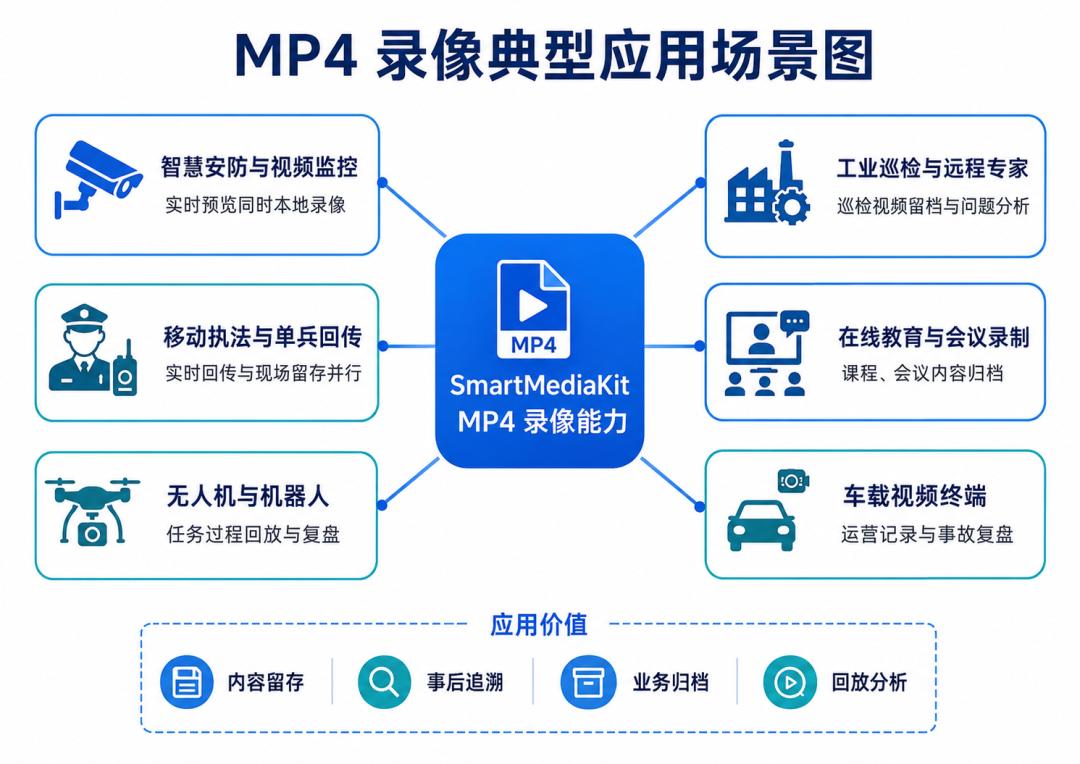
Smart security and video surveillance
The client pulls the RTSP stream from an IPC, NVR or encoder and records locally while previewing in real time.
Suited to park monitoring, store security, temporary deployment, key-channel recording and on-site evidence collection.
Mobile law enforcement and individual-soldier backhaul
Body cameras, Android terminals or smart helmets stream to a command centre in real time while saving local MP4 files.
Local recordings can be used for later evidence collection, case archiving and on-site review.
Drones and robotics
Drones, inspection robots and remote-control devices transmit live pictures to a platform while saving MP4 recordings at the terminal or ground station.
Suited to flight-mission archiving, equipment-anomaly analysis, inspection-process recording and remote-operation review.
Industrial inspection and remote experts
On-site personnel transmit video in real time to remote experts via mobile terminals, industrial tablets or robots while saving local recordings.
Recordings serve as important material for inspection reports, problem analysis and equipment maintenance.
Online education and meeting recording
Cameras, microphones, screens and system audio generate local MP4 files while streaming, for course playback, meeting minutes and content archiving.
In-vehicle video terminals
In-vehicle devices can upload live video to a management platform while saving local recordings, for fleet operation management, accident review and on-site records.
Live streaming and event content retention
When a client plays or pushes an RTMP live stream, the live content can be saved synchronously as MP4 for event playback, content editing and later distribution.
Video testing and problem analysis
When a camera or live stream shows artefacts, stuttering or audio/video desync, pull recording can save the on-site data for later reproduction and analysis.
7. Combining MP4 Recording With Other SmartMediaKit Capabilities
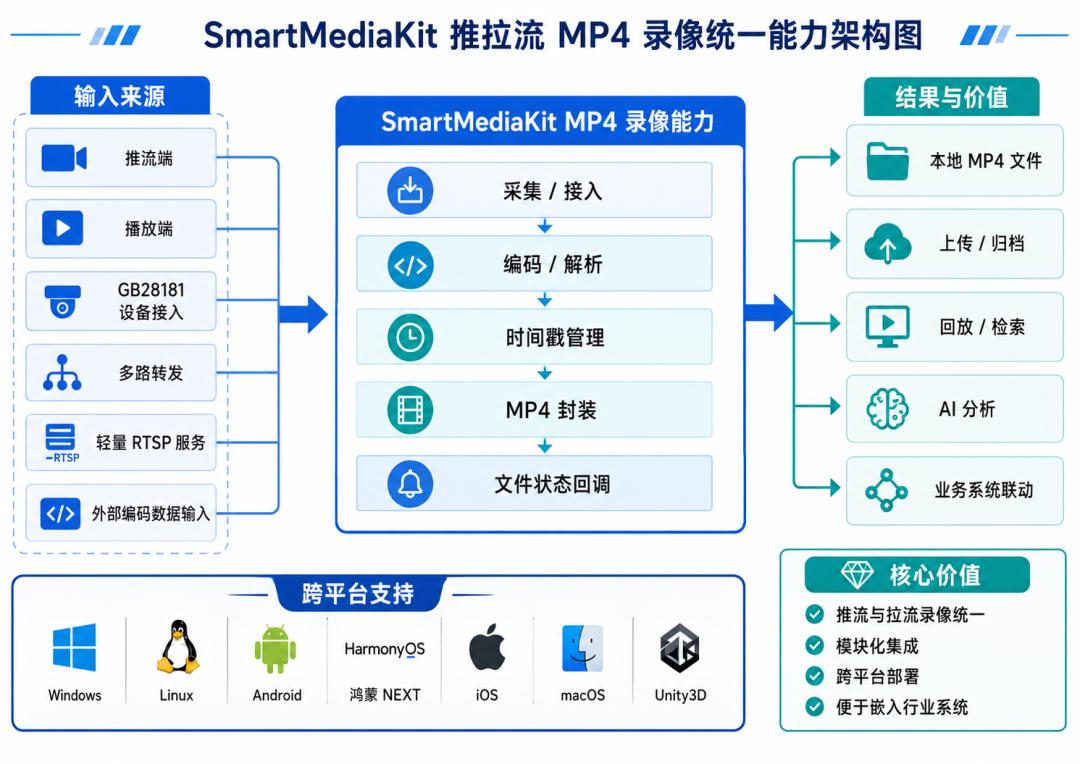
SmartMediaKit’s recording capability does not exist in isolation; it can be combined with different business modules.
Combined with the low-latency player
RTSP/RTMP pull stream
        ↓
Low-latency playback + MP4 recording + snapshot
Combined with RTMP streaming
Camera/screen/microphone
        ↓
RTMP streaming + local MP4 recording
Combined with GB28181 device access
Android terminal capture and encoding
        ↓
GB28181 real-time backhaul + local MP4 recording
Combined with multi-channel forwarding
Multiple RTSP/RTMP inputs
        ↓
Forwarding + selective recording
Combined with the lightweight RTSP service
External encoded data
        ↓
Lightweight RTSP service + local MP4 recording
This modular combination lets customers choose playback, streaming, recording, forwarding or national-standard access according to actual needs, without introducing a complex, heavyweight video platform.
8. Several Suggestions for Engineering Applications
Although the MP4 recording business interface is relatively simple, the following issues should still be noted in real projects:
- Check directory permissions and remaining disk space before recording;
- Use file segmentation for long-duration recording;
- Stop recording normally before stopping playback or streaming;
- Confirm the recording was generated via the file-completion callback;
- Create a new file when the codec format or resolution changes;
- Long-running devices should pair recording with cleanup and storage-management policies;
- Evaluate disk write speed and device performance for multi-channel recording.
These measures improve the stability of the recording module in unattended and long-running scenarios.
Conclusion
In real-time audio/video systems, streaming, pulling and recording carry different but interrelated responsibilities.
Streaming sends on-site audio and video to the remote end in real time, pulling receives and displays the remote video, and MP4 recording preserves the key content for playback, archiving, evidence collection and business analysis.
By reusing the existing capture, encoding, protocol-parsing and timestamp-management pipelines, SmartMediaKit delivers MP4 recording on both the push and pull sides. Its main value lies in:
- Streaming and recording sharing capture and encoding resources;
- Pull recording reusing the original encoded data as far as possible;
- Reducing the performance cost of duplicate encoding;
- Supporting simultaneous real-time playback, streaming and recording;
- Supporting cross-platform and multiple industry terminals;
- Combining with GB28181, forwarding, snapshot and lightweight RTSP service;
- Being easy to embed in customers’ existing business systems.
For industries such as smart security, mobile law enforcement, drones, robotics, industrial inspection, online education and in-vehicle terminals, MP4 recording extends real-time audio/video systems from “seeing and transmitting in real time” to “complete retention and continuous traceability.”
If you have any questions about this topic, feel free to contact us at [email protected]
FAQ
Q: What is the difference between push-side and pull-side recording?
Push-side recording saves what the device captures while it streams out; pull-side recording saves a remote RTSP/RTMP stream locally while receiving or playing it.
Q: Does recording add a lot of CPU load?
Not necessarily. Push recording reuses the already-encoded capture pipeline and pull recording reuses the already-received encoded data, so in many cases no decode/re-encode is required, avoiding duplicate processing.
Q: Why is local recording still valuable when the server also records?
They record different things: the local side records what the device actually captured, while the server records what was actually received. If the uplink fails, the local recording still preserves the on-site data.
Q: How are long recordings handled?
Through file segmentation — multiple files are generated by a configured policy, making time-based query, upload, storage management and expiry cleanup easier than one enormous file.
Q: Does Aomway work with real-time video and recording systems?
Aomway supplies FPV and UAV hardware, including video-transmission and link products, and follows developments in low-latency video pipelines for drone and industrial platforms. If you need help with a video link or recording setup, contact Aomway at [email protected].
Have questions about this article? Feel free to contact us at [email protected] — we’re happy to help!

WOW,Very wonderful
I AM BACK AGAIN