

1. Introduction
Ask any communications engineering student what the single best-value tech purchase they made during university was, and eight out of ten will answer: RTL-SDR. This $5–10 USB dongle — essentially a “hacked” digital TV tuner — instantly transforms your computer into a full-band radio receiver, covering the vast 24 MHz to 1.7 GHz spectrum. From FM broadcast to aircraft avionics, from weather satellite imagery to walkie-talkie conversations, the entire electromagnetic world unfolds across your screen.
This article approaches the topic from a communications engineering student’s perspective, exploring the hardware principles, first-time experience, hands-on projects, and the learning value this sub-$10 marvel delivers. Whether you’re a freshman just discovering radio or a senior wanting to visualize the spectrum, this is worth your time.
2. What Is RTL-SDR?
The origin story of RTL-SDR is pure cyberpunk: in 2012, a group of enthusiasts discovered that DVB-T TV sticks built around the Realtek RTL2832U chip could be driven with custom firmware to output raw 8-bit ADC I/Q samples directly to a PC. A piece of hardware designed to receive digital television suddenly became a wideband software-defined radio receiver spanning 24 MHz to 1.7 GHz.
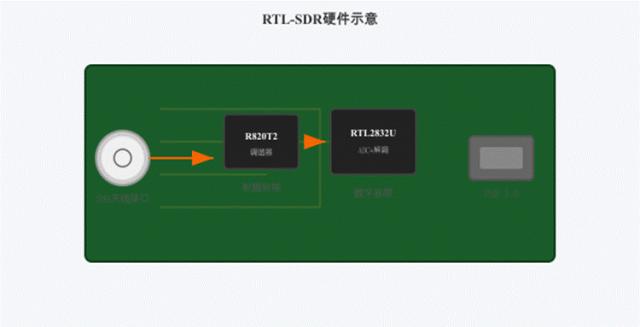
The most common hardware configuration pairs the R820T2 (RF tuner) with the RTL2832U (ADC + USB controller), retailing for $5–15. What does that price buy you? An SDR receiver that covers shortwave, FM broadcast, aviation bands, two-way radio bands, and even select satellite frequencies. In terms of cost-to-capability ratio, it has virtually no rival in the electronics engineering world.
3. Unboxing and First Impressions
Unwrap the package, and the contents are refreshingly humble: a lighter-sized USB stick, a telescopic whip antenna, and a tiny remote control. Build quality won’t win design awards, but it’s rugged. If you opt for the TCXO-equipped version, frequency stability improves significantly — essential for long-duration spectrum scanning without drift.
For Windows, the go-to application is SDR# (SDRSharp), a free and open-source SDR application with an intuitive interface and a rich plugin ecosystem. On macOS, CubicSDR or GQRX are excellent choices. The installation flow is straightforward: download the Zadig driver utility, insert the RTL-SDR, replace the default driver with WinUSB, launch SDR#, select RTL-SDR (USB) as the device source, and click play. The entire process takes under five minutes.
I still vividly remember the first time that spectrum display lit up. Dense signal peaks danced across the screen, and every single peak was a real electromagnetic wave — what you were seeing wasn’t code-generated animation, but actual radio signals within a few kilometers of your home. Broadband FM broadcast peaks, narrowband walkie-talkie spikes, AM-modulated aviation transmissions — every type of signal carries its own unique “spectral fingerprint.”
4. Understanding I/Q Sampling — The Core of SDR
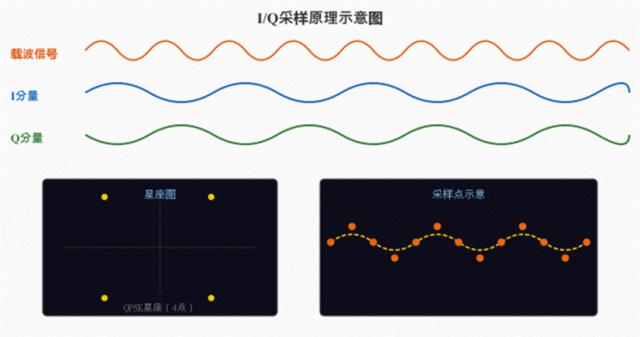
The heart of RTL-SDR lies in the RTL2832U chip’s ability to output raw quadrature (I/Q) sample streams. I/Q sampling is the foundation of modern software-defined radio: it simultaneously captures two orthogonal components of the signal — I (In-phase) and Q (Quadrature) — thereby preserving both amplitude and phase information in full. This is something simple time-domain waveform sampling cannot achieve, and phase information is critically important in wireless communication, since modulation schemes like QPSK and QAM encode data through phase variations.
I/Q sampling allows us to reconstruct the entire signal processing chain in software. When you adjust frequency, select a demodulation mode, or configure filter parameters in SDR#, you’re manipulating I/Q data in real time. Every spectrum plot you see is the result of the CPU performing FFT on the I/Q stream and rendering it frame by frame. A simple QPSK constellation diagram can give you immediate, intuitive insight into digital modulation.
5. The Communications Student’s Toybox — Real-World Projects
Though the RTL-SDR is a sub-$10 device, its use cases are remarkably rich. Here are the most compelling hands-on projects for communications engineering students:
5.1 Aircraft Tracking (ADS-B)
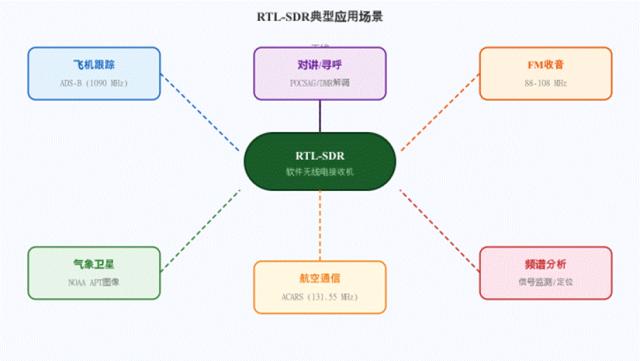
On the 1090 MHz band, commercial aircraft continuously broadcast ADS-B signals containing flight number, latitude/longitude, altitude, and speed data. Pair an RTL-SDR with dump1090 software, and you can track aircraft in real time, plotting flight paths on a live map. Reception range depends on antenna and terrain, with a maximum reach of over 300 km. This is a superb practical exercise for understanding aviation communication protocols and packet decoding.
5.2 Weather Satellite Image Reception
NOAA-18, NOAA-19, and other polar-orbiting weather satellites broadcast real-time infrared and visible cloud imagery in APT format around 137 MHz. With an RTL-SDR and a simple V-dipole antenna, you can receive these transmissions and, after decoding, view cloud photographs captured as the satellite passes overhead. A successful reception delivers an immense sense of achievement.
5.3 Live Modulation Mode Observation
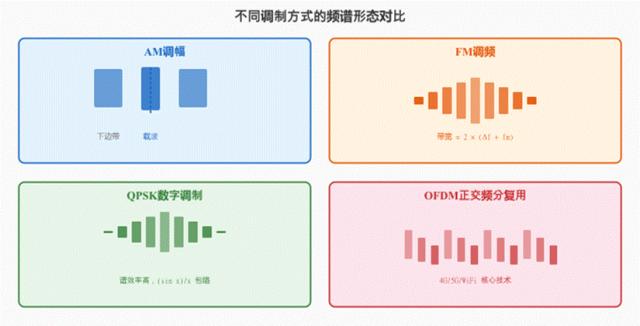
SDR# not only displays the spectrum — it demodulates signals in real time. Switch between demodulation modes (AM, NFM, WFM, USB, LSB) and observe how the same signal behaves under each. This is invaluable for understanding the modulation theory taught in communications courses.
5.4 Spectrum Monitoring & Analysis
Walk around campus with an RTL-SDR and a laptop, and you can “see” the wireless world: Wi-Fi routers in classrooms (2.4 GHz), wireless microphones on the podium, cafeteria walkie-talkies, and even electromagnetic leakage from certain devices. This “spectrum reconnaissance” skill is not only fun — it helps you visualize abstract concepts like spectrum allocation, signal modulation, and signal-to-noise ratio.
5.5 Two-Way Radio & Pager Systems
In the 400–470 MHz band, you can receive nearby analog FM two-way radio communications. Around 280 MHz, you might encounter POCSAG pager signals. Although pagers have exited the consumer market, many hospitals and factory systems still rely on them internally. Decoding these signals provides deep insight into the layered architecture of digital communication protocols and message encoding.
6. Antenna Selection — The Overlooked Critical Factor
Many RTL-SDR beginners complain about poor reception quality, and the most common culprit is an unsuitable antenna. The antenna is the first link in the radio chain, and the right antenna can improve reception quality more dramatically than a more expensive SDR device. Common antenna types include telescopic whips, discone antennas, planar disk antennas, and directional antennas — each suited to specific frequency bands and use cases.
7. Strengths & Weaknesses Analysis
|
Dimension |
Rating |
Notes |
|
Price |
★★★★★ |
$5–15, student budget territory |
|
Frequency Coverage |
★★★★☆ |
24 MHz–1.7 GHz, covers most common bands |
|
Ease of Use |
★★★★☆ |
Well-supported Windows drivers, SDR# is plug-and-play |
|
Sample Rate |
★★☆☆☆ |
2.4 MS/s, limited instantaneous bandwidth |
|
Receiver Sensitivity |
★★★☆☆ |
Weak-signal performance modest without external LNA |
|
Transmit Capability |
☆☆☆☆☆ |
Receive-only, cannot transmit |
|
Learning Value |
★★★★★ |
Arguably the cheapest hardware entry point to radio |
To be candid, the RTL-SDR is not a professional instrument. The 8-bit ADC offers limited dynamic range, the sample rate is only 2.4 MS/s, and it cannot be used for high-precision signal analysis. But just as a beginning programmer doesn’t need a supercomputer, for communications engineering students seeking to understand radio principles, the RTL-SDR is the ideal gateway tool — opening the door to the electromagnetic world at an almost negligible cost.
8. Conclusion
The story of the RTL-SDR is, at its heart, a story of accidental innovation. A group of hardware enthusiasts, through casual reverse engineering, uncovered the hidden capabilities of a consumer-grade chip — and in doing so, gave birth to an entire SDR entry-level ecosystem. Today, the RTL-SDR is standard equipment for radio enthusiasts worldwide, and for countless communications engineers, it was their very first SDR device.
If you ask me what single piece of external hardware was the best investment across four years of communications engineering, my answer is the RTL-SDR. Not because its performance is extraordinary — but because it lets you truly “see” the abstract electromagnetic wave world from your textbooks. When formulas and waveforms transform into real, pulsing signals on your screen, communications engineering stops being just a course — and becomes a way of seeing the world.
At Aomway, our FPV drone systems operate across multiple frequency bands — 2.4 GHz, 5.8 GHz, and increasingly in sub-GHz telemetry — and SDR tools like the RTL-SDR are invaluable for spectrum analysis, interference hunting, and antenna performance testing. For drone racers, event organizers, and RF engineers working on next-generation UAV communication links, an RTL-SDR running SDR# or a spectrum analyzer is the fastest way to visualize band congestion, identify noise sources, and optimize frequency selection before takeoff. Whether you’re troubleshooting the 5.8 GHz video downlink on an Aomway Commander system or mapping the local RF environment for a drone race, this $10 tool earns its place in every FPV toolkit. Have questions about SDR applications for drone communications or spectrum analysis workflows? Contact us at [email protected].
Frequently Asked Questions
1. What’s the difference between an RTL-SDR with and without a TCXO?
The standard RTL-SDR uses a generic crystal oscillator with a frequency tolerance of roughly ±50–100 ppm, meaning at 1 GHz your displayed frequency could be off by 50–100 kHz — and as the chip heats up, this deviation drifts. A TCXO (Temperature-Compensated Crystal Oscillator) version brings tolerance down to ±0.5–1 ppm and is far more stable across temperature changes. For applications like ADS-B (where the signal is only ~2 MHz wide at 1090 MHz) or narrowband digital modes, the TCXO is well worth the $5–10 premium.
2. Can an RTL-SDR receive drone FPV video signals?
Partial yes, but with important caveats. Analog FPV video (typically FM-modulated on 5.8 GHz) is above the RTL-SDR’s native 1.7 GHz ceiling. However, with an external downconverter or an RTL-SDR variant that includes an E4000 or R820T2 tuner with harmonic mixing, some users have achieved reception up to ~2.2 GHz — still below 5.8 GHz. For FPV spectrum analysis, a dedicated 5.8 GHz spectrum analyzer like the TinySA Ultra (covered in a previous article) is a more practical tool.
3. How do I get started with NOAA satellite image reception?
The minimum setup: RTL-SDR + a V-dipole antenna (two 53.4 cm elements at a 120° angle, mounted horizontally). Software stack: SDR# to receive and record the 137 MHz FM signal (40 kHz bandwidth), WXtoImg or NOAA-APT for decoding. Schedule your reception for a satellite pass with an elevation above 30° (track via n2yo.com or GPredict). The first successful decode — seeing cloud patterns you captured from a satellite 800 km overhead — is genuinely unforgettable.
4. Why does the RTL-SDR have such a narrow instantaneous bandwidth?
The limitation comes from the RTL2832U’s USB 2.0 interface and the R820T2 tuner architecture. At 2.4 MS/s with 8-bit samples and I/Q pairs, the raw data rate is ~4.8 MB/s, which is already near the practical ceiling of USB 2.0 bulk transfers. Newer SDRs like the Airspy R2 (10 MS/s) or HackRF One (20 MS/s) use USB 3.0 or dedicated high-speed interfaces to achieve wider bandwidths, but at 10–40× the cost. For learning purposes, 2.4 MHz of instantaneous bandwidth covers most narrowband and medium-bandwidth signals of interest.
5. Is it legal to use an RTL-SDR to receive these signals?
Laws vary by jurisdiction. In most countries, receiving public broadcasts (FM radio, weather satellite downlinks, ADS-B aircraft telemetry) is perfectly legal. Monitoring amateur radio bands is generally fine. However, in some jurisdictions, receiving certain frequencies (cellular bands, encrypted police communications) may be restricted, and in a few countries, even possessing a wideband receiver requires a license. Always check your local regulations. The RTL-SDR’s driver includes a hardware gap from approximately 800–900 MHz to avoid cellular downlink by default, but responsible use is ultimately the operator’s responsibility.

Pingback: Thermal Noise Floor: Where -174 dBm/Hz Really Comes From – AOMWAY