
Key Takeaways
- PX4 Autopilot holds 12,702 GitHub stars and 16,076 forks, hosted by the Dronecode Foundation under the Linux Foundation.
- It ships under BSD-3-Clause, so commercial teams can sell closed-source airframes without releasing application code.
- A five-layer cascade controller runs from a 50 Hz position loop down to a 1 kHz angular-rate loop.
- PX4 SITL simulates the complete autopilot on a laptop through a single Docker command, with no hardware.
- Modules talk over the uORB message bus, so a new sensor attaches without editing the core controllers.
PX4 Autopilot is the open-source flight controller firmware that answers a question every drone team eventually faces: write your own control stack, or adopt one that is already tuned. As of 2026 the project counts 12,702 GitHub stars and 16,076 forks under the Dronecode Foundation, and it is released under the permissive BSD-3-Clause license. Running on NuttX, Linux, and macOS, PX4 owns everything from IMU and GPS drivers to attitude estimation, motor mixing, failsafe, and return-to-launch.
What Is PX4 Autopilot?
PX4 is open-source flight control firmware that runs on the NuttX real-time operating system as well as Linux and macOS. It handles the lowest layer of a drone’s flight, from power-on to touchdown: reading the IMU and GPS, estimating attitude and position, computing motor outputs, and managing failsafe and return-to-launch behavior.
Vehicle support extends far beyond ordinary multirotors. Fixed-wing aircraft, VTOL fixed-wing, ground rovers, helicopters, autogyros, airships, submersibles, and boats are all on the supported list. Hardware follows the open Pixhawk ecosystem, and most mainstream flight controller boards can be flashed with PX4.
The license is BSD-3-Clause. That means you can flash PX4 onto your own hardware, modify the source, and sell a closed-source airframe without publishing your application code — a significant legal saving for teams building commercial products. This is also the sharpest dividing line when choosing between PX4 and ArduPilot (GPLv3). For a closed-source airframe, PX4’s BSD terms let you keep application code private, while ArduPilot’s strong copyleft obliges you to open-source derivative firmware.
The uORB Message Bus: Why PX4 Scales Beyond Multirotors
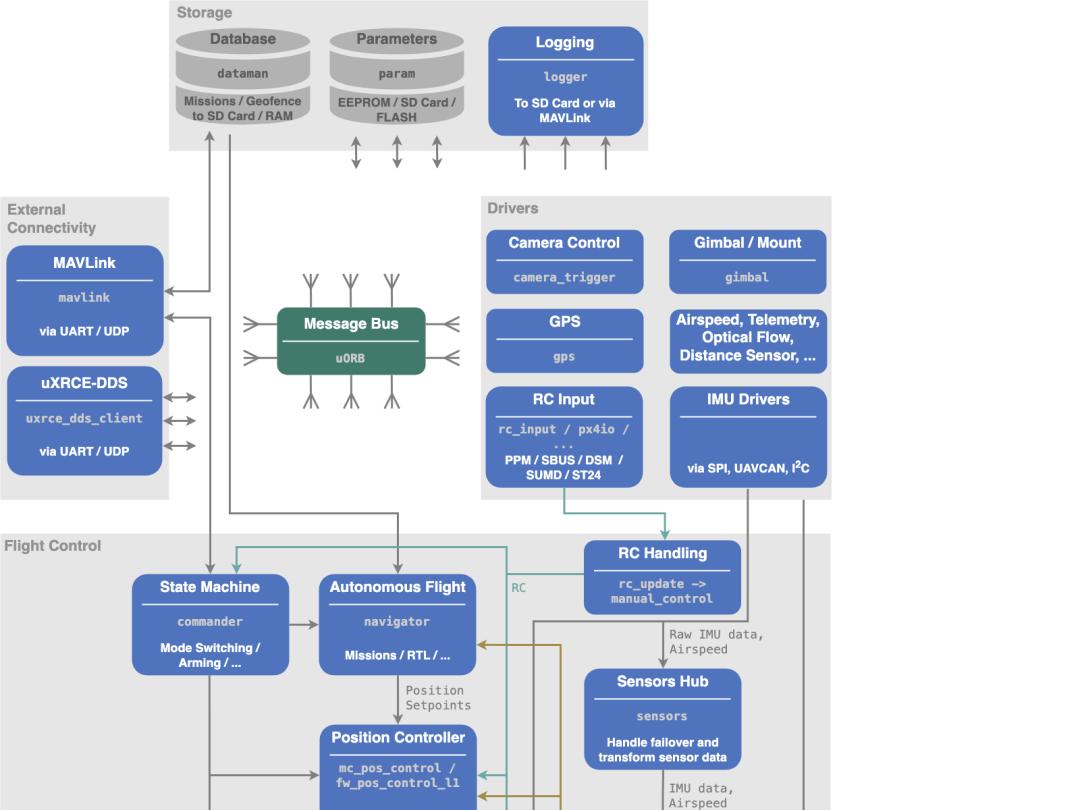
The core of the architecture is the Message Bus in the middle of the diagram, known inside the project as uORB. The GPS driver publishes a GPS message to the bus and the state estimator subscribes to it; the attitude controller publishes its output and the mixer subscribes. Modules never call each other’s functions directly — everything travels over the bus.
The practical benefit is direct: to add a custom sensor, you write a new module, attach it to the bus, and publish a message — no edits to existing drivers or controllers. That is the fundamental reason PX4 scaled from multirotors to fixed-wing aircraft and on to submersibles.
How PX4 Flies: The Five-Layer Cascade Controller
Start with the part that saves development teams the most work: five-layer cascade control. On a multirotor, a position command passes through five loops before it becomes motor output.
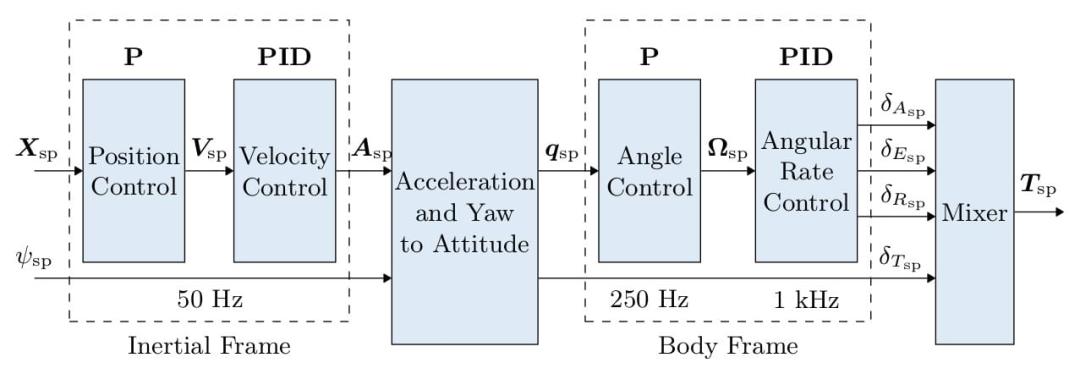
The outermost position loop runs at 50 Hz, taking a target position and emitting a target velocity. The velocity loop is a PID controller that outputs a target acceleration. An intermediate stage converts that acceleration plus the yaw angle into a target attitude quaternion.
Further in, the attitude loop runs at 250 Hz and the angular-rate loop at 1 kHz, before the mixer distributes roll, pitch, yaw, and throttle commands across the four motors. Writing this yourself means tuning countless parameters; PX4 ships tuned defaults, so a new airframe only needs small adjustments.
PX4 SITL: Simulate a Full Autopilot Without a Drone
The hardest part of drone development is not writing code — it is finding somewhere to fly it. PX4’s SITL (Software In The Loop) simulation runs the entire autopilot on a computer, with no aircraft required. Teams that already use a similar workflow in ArduPilot SITL simulation will find the PX4 setup familiar.
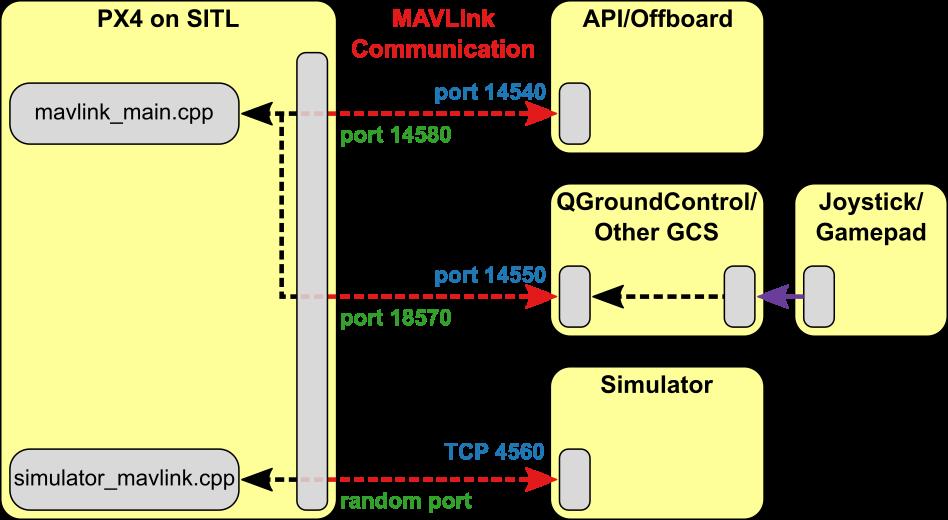
A single Docker command brings up a simulation environment:
docker run --rm -it -p 14550:14550/udp px4io/px4-sitl:latestOnce it is running, connecting QGroundControl to port 14550 shows a virtual drone flying in Gazebo. Your own onboard algorithm connects to port 14540 and sends Offboard commands over MAVLink — exactly the same protocol a real aircraft uses.
QGroundControl: The Free Ground Station That Ships With PX4
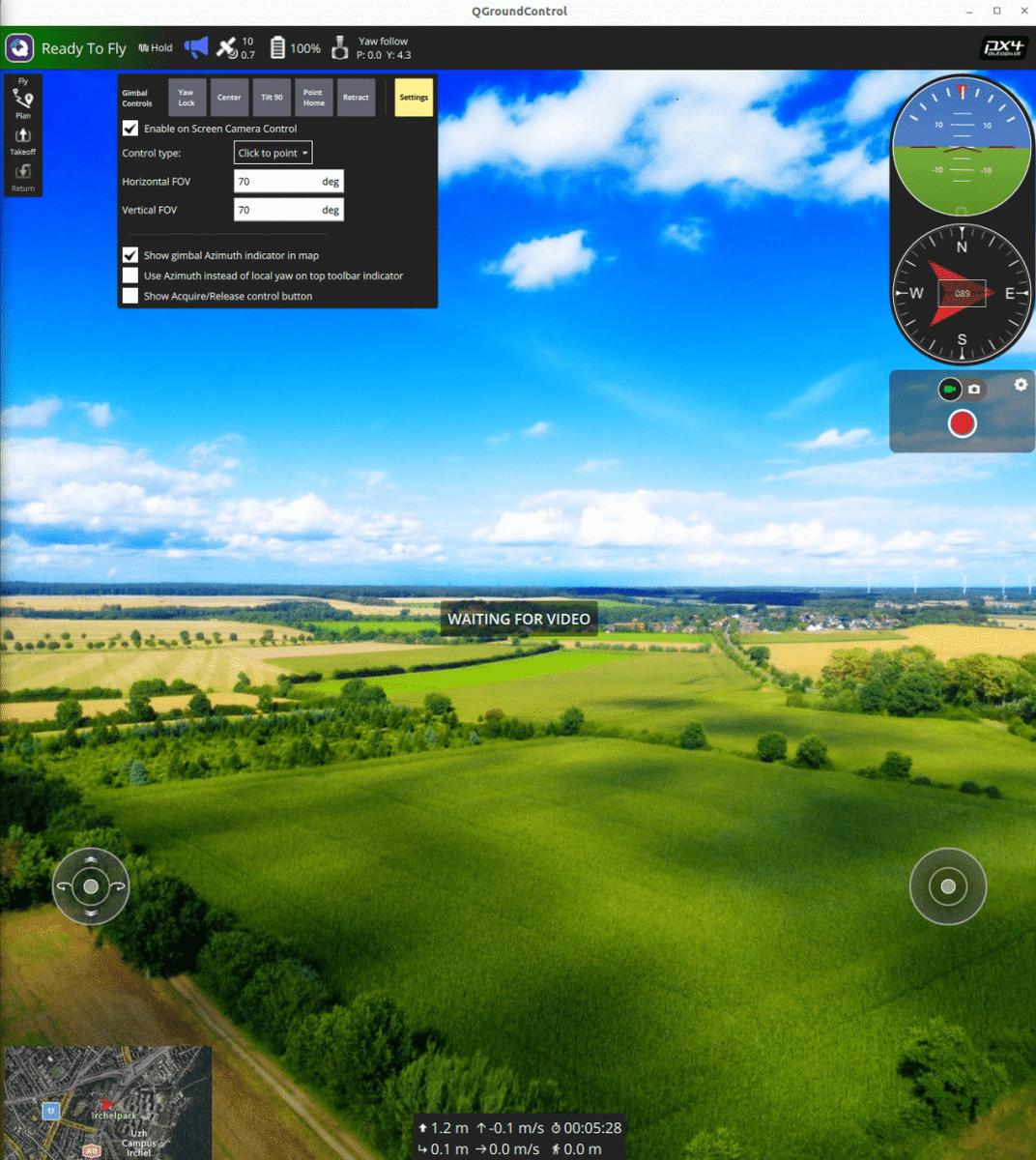
QGroundControl (QGC) is the companion ground station, free and open source. Mission planning, parameter tuning, flight-log review, and gimbal control all live in one interface. When you deliver a system, the customer’s operator flies with QGC — you never have to build a ground station yourself. For a deeper look at what a modern ground station can render, see this QGroundControl 3D digital twin built with Cesium.
Companion Computers, MAVLink, and ROS 2
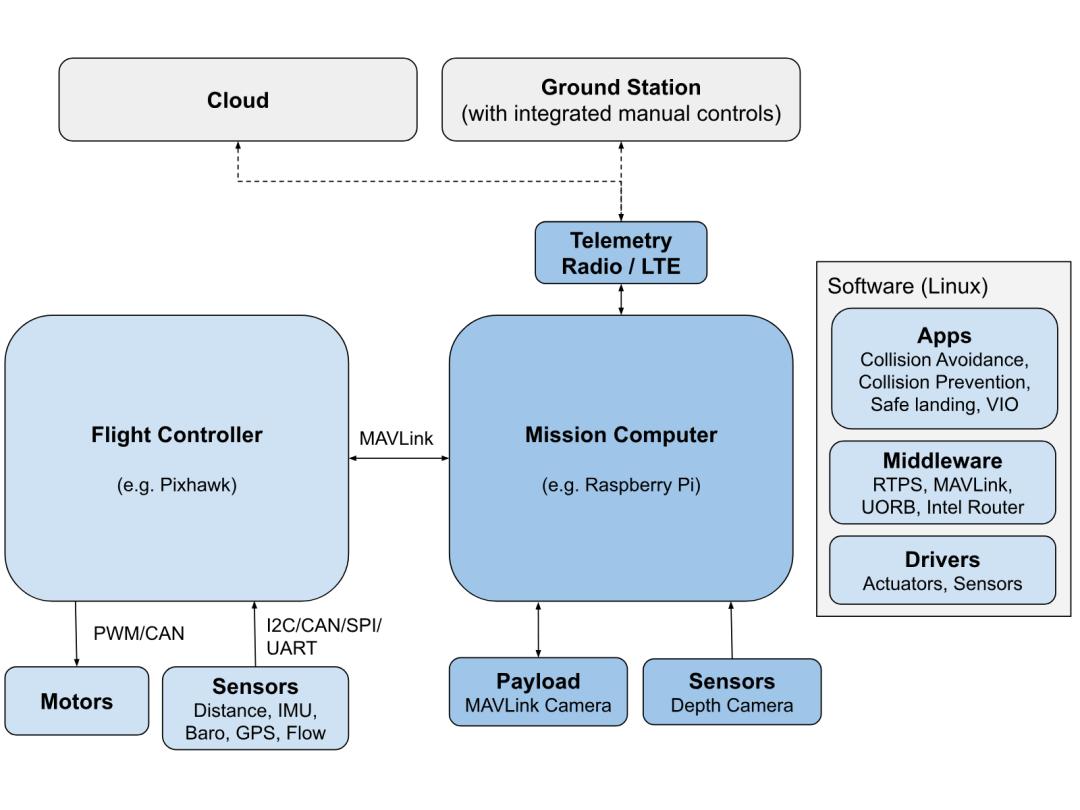
For teams doing secondary development, the typical split is this: the PX4 flight controller board runs hard-real-time attitude and position control, while a companion computer (a Raspberry Pi or Jetson) runs vision, path planning, and other business logic that does not need hard real time. The two sides communicate over MAVLink, and the same pattern is covered in this pymavlink companion computer setup for a Raspberry Pi.
Your algorithm publishes setpoints from the companion computer and PX4 flies the aircraft there. In this architecture the vision team and the flight-control team work independently without touching each other’s code.
Beyond MAVLink, PX4 supports DDS/ROS 2 as a first-class citizen: uxrce_dds_client attaches directly to the uORB bus. Teams working with a robotics stack no longer need to hand-write a translation layer between the autopilot and ROS 2 — topics interoperate directly.
Sensor Redundancy for Industrial Reliability
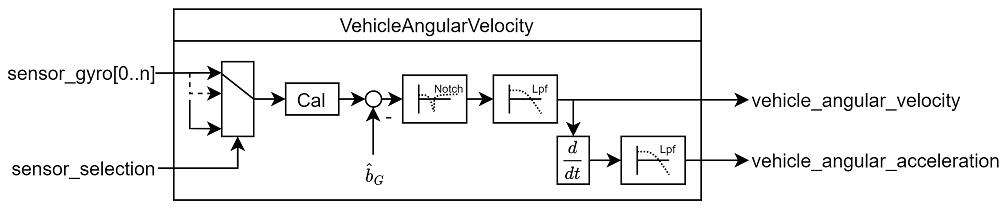
Sensors deserve a mention too. PX4 supports multiple redundant IMUs and automatically fails over if one misbehaves. Many commercial drone crashes are not algorithm failures at all — they trace back to an IMU drifting with temperature or coming loose. In industrial settings, that redundancy is what keeps an aircraft alive.
PX4 vs ArduPilot: License and Governance at a Glance
| Aspect | PX4 Autopilot | ArduPilot |
|---|---|---|
| License | BSD-3-Clause | GPLv3 |
| Closed-source commercial airframe | Allowed — application code stays private | Not allowed — derivative firmware must be open-sourced |
| Governance | Dronecode Foundation (Linux Foundation) | — |
| GitHub stars (2026) | 12,702 | — |
PX4 Autopilot at a Glance
| Attribute | Detail |
|---|---|
| GitHub stars | 12,702 |
| Forks | 16,076 |
| License | BSD-3-Clause |
| Governance | Dronecode Foundation, under the Linux Foundation |
| Runs on | NuttX RTOS, Linux, macOS |
| Vehicle types | Multirotor, fixed-wing, VTOL, helicopter, autogyro, rover, boat, submersible, airship |
| Ground station | QGroundControl |
| Comms protocols | MAVLink, DDS/ROS 2 |
When to Use PX4 — and When Not To
PX4 fits teams building inspection, surveying, agricultural, or logistics drone solutions that need a reliable autopilot without reinventing it; universities and research institutes that need a reproducible simulation environment for flight algorithms; and hardware startups that want to ship a product closed-source under a BSD license.
PX4 is the wrong choice in three situations. Do not treat it as ground-station software — it is firmware, and you still install QGC separately or build your own with MAVSDK. Teams without NuttX or Linux embedded experience should not start by editing the source; begin with prebuilt firmware and parameter tuning. And do not expect a flash-and-fly experience: airframe configuration, PID fine-tuning, and sensor calibration are all unavoidable.
PX4 Project Links
- PX4 repository: https://github.com/PX4/PX4-Autopilot — 12.7k stars, BSD-3, hosted by the Dronecode Foundation
- Official docs: https://docs.px4.io/main/en/ — user guide and developer guide
- Website: https://px4.io — industry case studies and hardware ecosystem
- QGroundControl: https://docs.qgroundcontrol.com/ — the companion ground station
- MAVLink: https://mavlink.io/ — the autopilot-to-companion protocol
- Dronecode Foundation: https://www.dronecode.org/ — the open drone organization under the Linux Foundation
Have questions about this article? Feel free to contact us at [email protected] — we’re happy to help!
Frequently Asked Questions
Is PX4 Autopilot free for commercial use?
Yes. PX4 is released under BSD-3-Clause, so you can flash it onto your own hardware, modify the source, and sell a closed-source airframe without publishing your application code. Only ArduPilot’s GPLv3 copyleft obliges you to open-source derivative firmware.
What is the difference between PX4 and ArduPilot?
The biggest difference is licensing and governance. PX4 uses BSD-3-Clause and is hosted by the Dronecode Foundation, while ArduPilot uses GPLv3. For closed-source commercial products, PX4 lets you keep your application code private, which removes a large legal cost.
Can you test PX4 without a real drone?
Yes. PX4’s SITL simulation runs the entire autopilot on a computer. One Docker command starts the environment, and QGroundControl connects on port 14550 to fly a virtual aircraft inside Gazebo, while your own algorithm talks to port 14540.
How many control loops does PX4 use?
PX4 uses a five-layer cascade on multirotors: a 50 Hz position loop, a PID velocity loop, an attitude solve stage, a 250 Hz attitude loop, and a 1 kHz angular-rate loop, after which the mixer splits commands across the motors.
Which vehicles does PX4 Autopilot support?
PX4 supports multirotors, fixed-wing aircraft, VTOL fixed-wing, helicopters, autogyros, ground rovers, boats, submersibles, and airships. It runs on the open Pixhawk hardware ecosystem, so most mainstream flight controller boards can be flashed with it.
About Aomway
Aomway is a technology company specializing in drone and FPV equipment, publishing in-depth analyses of flight-controller software, MAVLink integration, and autonomous navigation. With over 15 years of industry experience, Aomway covers the full spectrum from flight controllers and FPV goggles to thermal imaging cameras and long-range datalinks for the global drone community.